Morph Studio · private beta

Describe the job. Get the robot designed.

Aedile is planning a whole crew of city robots, and designing each new one by hand is slow. So we built Morph Studio, starting with the simplest case: tell it in one sentence what a tabletop arm should do, answer a few quick questions, and it designs the whole robot arm: CAD, electronics, joint-level firmware, a physics simulation, a manufacturing plan, a costed parts list and an assembly manual. Want it different? Just say so.

one sentence in

“I want a robot arm that moves cupcakes from a cooling rack tray into boxes at my bakery”our bakery test run, with Claude
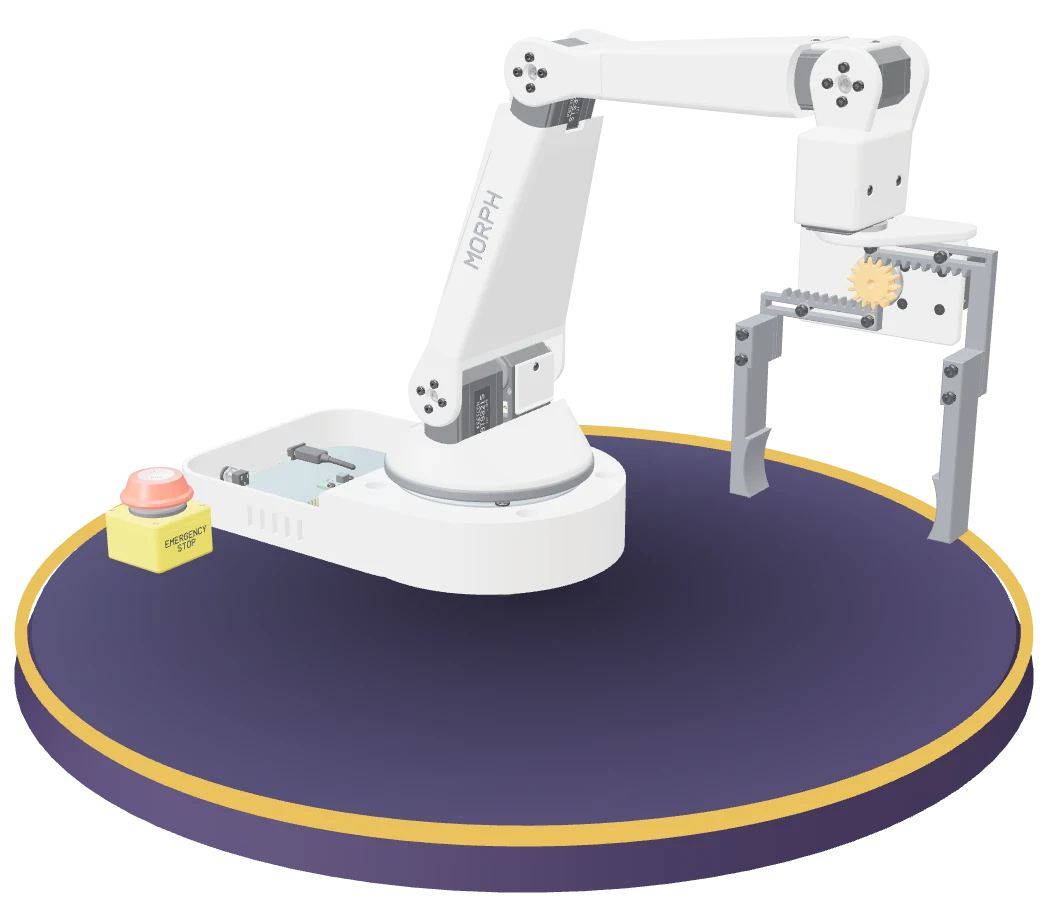
The cupcake-picking arm Morph Studio designed from that sentence, on a turntable: a white five-joint arm on a base with its electronics and an emergency stop, holding a two-finger gripper open.
241 h by hand, against ~1 min + a few hours of reviewOne design revision by hand (an experienced engineer's typical time) vs Morph's first draft: ~1 min from first message to finished design in the bakery run, with Claude. An engineer still reviews it.
~$295estimated parts for the bakery run's arm
5.9 sper pick-and-place cycle, passing in simulation (same run)
How it works

One sentence in.
A whole robot design out.

A custom robot normally means stitching together CAD, simulation, electronics, firmware and a dozen part suppliers, then redoing all of it every time the design changes. Morph Studio puts that whole loop in one place. Here's one run, start to finish: strawberries, read by Morph's built-in rules with no Claude key.

1

Describe the job

Type what the robot should do, the way you'd explain it to a coworker. Morph builds a tabletop arm with a two-finger gripper that picks things up and puts them down, and it says up front what you get and what you don't.

pick strawberries into punnetssort socks into binshand me screwdrivers
The New robot dialog in Morph Studio, with the request typed in: I need a robot arm that picks strawberries from a tray and puts them in punnets.
New robot: one sentence, plus what Morph builds, what you get and what it doesn't write.
2

Answer a few questions

Morph asks up to three rounds of quick questions with one-tap answers: how fast, who works nearby, what it's holding. Skip them and it takes sensible defaults. Every assumption stays on screen in the brief, so nothing is hidden.

With your own Claude key, Claude reads your request and answers, however you put it. Without one, Morph's built-in rules do: they handle common, plainly worded requests like this one. The build after that is the same pipeline either way.

Morph Studio asking two quick questions about the strawberry request, each with one-tap answers and a default: how fast it needs to work (one every 10 s, one every 6 s, or as fast as it can) and whether people work right next to it.
Morph's quick questions, each with one-tap answers and a default. The brief sits beside them in the Studio.
3

Get the whole robot

Morph sizes every joint, then generates the CAD, electronics, joint-level firmware, simulations, a manufacturing plan, the parts list and the assembly manual, with a timeline of each step. Then it runs its software checks on the result: simulation, torque margins, DRC and DFM.

See every file it makes
Your robot is designed: software checks pass, estimated parts cost 289 dollars, pick and place succeeds, 5.9 second cycle time, maximum payload 979 grams, and the assumptions Morph made (layout, budget, a 3D-printed prototype), each with one-tap alternatives.
Done: cost, simulation result and cycle time, then every assumption Morph made, each one tap to change.
4

Simulate it, then chat to change it

Watch the pick-and-place run in a MuJoCo physics simulation, with live joint torques, cycle time, payload and reach. Then ask for a change in your own words, or tap a suggestion. Only what depends on the change rebuilds, while you watch.

make it cheaperadd a wrist camerause a custom PCBswap to Dynamixel servos

Free-form requests need your Claude key; the suggestions and common phrasings work without one. A wrist camera means the camera and its wiring: Morph doesn't write vision code.

The Simulation tab: the arm carries a strawberry from the pick point to the place point, with a success badge, cycle time 5.91 seconds, reach 465 mm, live grip force, a torque plot and peak torque for each joint.
The Simulation tab: the arm runs its pick and place, with the result and live joint torques beside it. Payload, workspace and shake tests are one click away.
What you get

The circuit board, firmware and manual too.
Every file, in sync.

One request gives you the files an engineering team would normally make by hand, and they stay in sync: change one thing and only what depends on it regenerates. What it doesn't write: the task program and vision code. Here they are for the strawberry picker above, after one chat edit: “use a custom PCB”.

A circuit board, designed for the arm

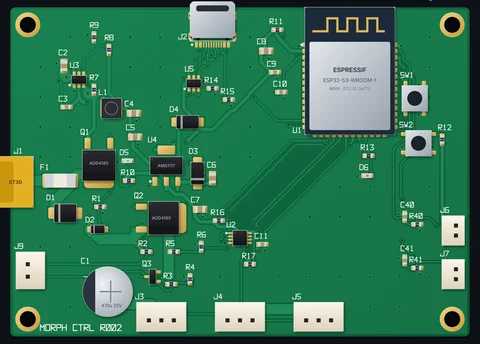
Ask for a custom PCB and Morph designs the controller board itself: an ESP32-S3, a servo-bus buffer, 5 V and 3.3 V regulators, a protected 12 V input and a servo power switch the e-stop cuts.

A rendered view of the controller board Morph laid out for the strawberry picker, labelled MORPH CTRL R002: a green 92 by 66 mm board with an Espressif ESP32-S3-WROOM-1 module, a USB-C port, an XT30 power input, two AOD4185 power MOSFETs, an AMS1117 regulator, a 470 microfarad capacitor and three servo-bus connectors.
Rendered from the board_render.svg Morph exported for this design.
  • 92 × 66 mm2 layers, 1.6 mm FR4
  • 62 parts49 SMD, 9 through-hole, 4 mounting holes
  • $49.46per board to have JLCPCB assemble it, 12 days (Morph's estimates; it flags a 5-board minimum order)
  • 48 minto fit and wire it, against 90 min with off-the-shelf modules (Morph's estimates)

Files:board.jsonboard.svgboard_render.svg

Routed, then design-rule checked

Morph places the parts, routes every connection on two layers and runs a design-rule check: 0 violations, nothing left unrouted. Gerbers come with it, plus the parts list and pick-and-place file for JLCPCB's assembly service (half of that list's 36 lines still need a JLCPCB part number looked up).

The same board, routed: red front-copper and blue back-copper traces between the labelled parts (U1 ESP32-S3-WROOM-1, J2 USB-C, U3 TPS563201, Q1 and Q2 AOD4185, U2 74LVC2G241, J3 to J5 servo bus A to C, J6 and J7 force sensors, J9 e-stop), with the design-rule check passing; 92 by 66 mm, 2 layers, 1.6 mm FR4.
Morph Studio: Electronics, PCB, with the routing, ground pour and DRC done.The board.svg Morph exported. Front copper red, back copper blue.
  • 157 traces1,141 mm of them in all
  • 134 vias0.6 mm across, 0.3 mm drill
  • 34 netsall routed, with a ground pour
  • 0 violationsin the design-rule check, at 0.2 mm clearance

Files:gerbers.zipjlc_bom.csvjlc_cpl.csv

Schematic and wiring harness

Controller, power supply, schematic and wiring harness, picked to fit the servos. Here: a one-sheet schematic of the board and a harness of 11 cables, each with its length, wire and connectors.

Part of one block of the schematic Morph drew, with part values and net labels: the power input and protection (J1 12 V in, the J9 e-stop loop that opens to cut servo power, a 10 A fuse F1, an SMBJ15A TVS diode, AOD4185 MOSFETs Q1 for reverse polarity and Q2 for switching the servo rail, a 2N7002 Q3 driven by SERVO_EN, a 470 microfarad capacitor and a divider for sensing the servo voltage), or on narrow screens the ESP32-S3 controller with its pins and net labels.
A crop of the schematic.svg Morph exported (one A3 sheet): the power input blockthe ESP32-S3 block.
  • 58 partsthe board's 62 less its 4 mounting holes, in six circuit blocks
  • 34 netsthe same nets the board routes
  • 11 cablesservo bus 165 to 236 mm, shielded sensor leads, power, USB, e-stop
  • 7.7 A peakon the 12 V servo rail, from a 10 A supply

Files:schematic.svgharness.csvharness_cutlist.csv

Joint-level firmware

An Arduino sketch for the board's ESP32-S3: a serial command server for the five joints and the gripper, with the grip force set from the object and a software e-stop. No task program, inverse kinematics on the robot or vision code.

Morph Studio's Firmware tab showing morph_arm.ino under the Studio's warning: generated firmware, not bench-tested, it hasn't been compiled for this board or run on the arm. Lines 42 to 62 define the servo-voltage divider, five joints with their limits, home and ready angles, and five servos on bus IDs 1 to 5.
Morph Studio: Electronics, Firmware, with the Studio's own warning on top (a narrower Studio window).
  • 390 linesArduino C++, generated from the design
  • 100 Hzcontrol loop, force-controlled grip
  • 1 MbaudFeetech servo bus
  • 6 servosfive joints and the gripper

Not yet compiled for this board or run on an arm. Review it, then test it on the bench.

File:morph_arm.ino

Parts list and cost

Every line with quantity, estimated cost and where to buy it, from the six servos to the board Morph designed. With network lookups on, Darwin also shortlists agents that can sell or fabricate parts, where it finds one.

Morph Studio's BOM and Sourcing tab. The first rows of the parts list: six Feetech STS3215 serial bus servos to buy, the Morph controller PCBA to make by ordering it from JLCPCB with gerbers.zip, jlc_bom.csv and jlc_cpl.csv, and a 22 mm latching emergency-stop switch to buy. On wider screens it also shows the totals (unit cost 303.28 dollars as a prototype, 14.05 dollars more than revision r001; 158.89 dollars bought from 11 vendors; 144.39 dollars built in-house), more rows and each part's vendors and prices, such as 49.46 dollars for the PCBA from JLCPCB.
Morph Studio: BOM & Sourcing, the first rows of the list.
  • $303.28per robot as a printed prototype: $14.05 more than r001, which used off-the-shelf modules
  • 55 lines139 pieces in all
  • $158.89to buy: 26 items from 11 vendors
  • $144.39to make: 24 items, printed or fabricated

Manufacturing plan

How to make every part as a prototype, a pilot run or in production: 3D printing, CNC, sheet metal, with lead times and tooling, and print checks such as overhangs. The prototype here is 23 printed pieces plus the board and harness.

Morph Studio's Manufacturing tab at quantity 1: build cards for a prototype at 303.28 dollars a unit with no tooling and a 14-day lead time, and a pilot run at 517.06 dollars; below them the parts table, each part with its process, vendor, price, lead time and print warnings, such as 89.3 square centimetres of overhang on the base shell. On wider screens it also shows the production card (4,774 dollars a unit at quantity 1 plus 73,374 dollars of tooling, 40 days), each part's STL and 3MF files and the arm in 3D.
Morph Studio: Manufacturing.
  • $303prototype, each at qty 1: printed PETG and TPU, 14 days, no tooling
  • $517pilot, each at qty 1: MJF, SLA and CNC parts
  • $4,774production, each at qty 1, plus $73,374 of tooling once; about $288 each at 1,000, tooling included
  • ~33 hon one printer and 785 g of filament if you print every part yourself (our sum of Morph's per-part estimates)

Files:STL + 3MF per partmfg_prototype.zip

Assembly manual

Step-by-step build instructions that write themselves from the design, and rewrite themselves when it changes: from the base to the first pick-and-place test, including flashing the firmware and calibrating the force sensors. Here, step 2 puts the new board in the electronics bay.

A page of the assembly manual: step 2 of 18, electronics bay, 17 minutes, 4 fasteners, 8 parts. An exploded 3D view shows the controller board dropping onto brass standoffs in the base's electronics bay beside the e-stop, held by four M3 by 5 screws, with tables of parts and fasteners at 0.8 newton metres, four numbered instructions, an ESD warning and the tools needed.
Page 6 of the manual.html behind the Studio's Manual button.
  • 18 stepseach with its parts, fasteners and tools
  • 4 h 48 minestimated build time
  • 24 pagesone HTML file, ready to print
  • 18 toolslisted, down to the crimp tool

Files:manual.htmlmanual.json

Physics simulation

MuJoCo pick-and-place, payload sweep, workspace and shake tests, with cycle time, payload and torque on every joint. In the payload sweep, its joints carry up to 979 g at 220 mm before the shoulder servo runs out of torque: about 49 times the 20 g strawberry. (The gentle grip set for strawberries would hold about 306 g.)

Morph Studio's Simulation tab on the payload sweep, paused while the arm holds the load at far reach: success, maximum payload 979 grams, task payload 20 grams, at 220 mm reach, shoulder torque 2.49 newton metres, and peak torque per joint with the shoulder at 100 percent of stall. On wider screens it also shows the whole arm, the payload curve from 20 to 833 grams and a torque plot marking where the shoulder saturates.
Morph Studio: Simulation, payload sweep, paused while the arm holds the load.
  • 5.91 spick-and-place cycle, against a 6 s target
  • 1.1 Npeak grip; strawberries bruise above about 3 N
  • 465 mmreach, with a 309° base sweep
  • 0.31 mmof slip in the shake test, nothing dropped

Files:robot.xmlsim_*.json

CAD

The full 3D arm: printed parts, servos, brackets and boards, sized to the job and ready to print or machine. Spin three of them in 3D.

Use the arm you have

Already own an SO-101 (Hugging Face's open-source arm)? Morph can design the job around it instead of a new arm.

Every picture and number in the tabs above is from one design on one computer: the strawberry picker from How it works, revision r002, made by the chat edit “use a custom PCB” with no Claude key. Morph re-ran 6 of its 9 build stages for it and reused the sizing, gripper and simulation results. Most pictures are Morph Studio's own screens; the board render, the schematic, the manual page and, on phones, the routed board are files Morph exported, shown in a browser. Everything is checked in software only, not bench-tested, and costs are Morph's estimates.

Designed for your browserThe hosted beta brings CAD, simulation, electronics and build files into one online workspace, with no local installation.
Your own workspaceApproved testers get a private workspace for projects and settings. Hosted work requires an internet connection.
Bring your model keyOnce you have access, add your own Claude key for free-form requests. Model usage is billed by your provider.
Another run, with Claude

Say a bakery wants a hand.

“I want a robot arm that moves cupcakes from a cooling rack tray into boxes at my bakery”the request: our own test prompt
Morph asked one question: how fast does it need to work? The reply skipped it and gave the rest (“they weigh about 80 g and they're 65 mm wide, and my staff work right next to it”), so Morph kept its default of one every 6 s and had its brief.the conversation
5 joints

a desk arm with smart-bus servos and a two-finger gripper

~$295

in parts, from Morph's cost model (estimates, not vendor quotes)

5.9 s

per cycle, with pick and place passing in simulation

~1 min

from first message to finished design (the build took 21 s); Claude read each turn in 3 to 4 s

One run of our own test prompt (not a customer), with a Claude key reading it: the arm at the top of this page. Every number comes from that run's own records, simulation and cost estimate, not a bench test, and your job will give different ones. You can spin this exact arm below.

Real outputs

Robots Morph designed.
Grab one and spin it.

These are the actual 3D models Morph Studio exported for three jobs, with every printed part, servo and circuit board in place. Drag to spin.

The 3D viewer loads when you get here
CUPCAKE PICKER drag to spin
I want a robot arm that moves cupcakes from a cooling rack tray into boxes at my bakery
Joints
5
Parts
178
Parts cost
~$295
Sim cycle
5.9 s
Reach
510 mm
Gripper
two-finger
The run above: our own test prompt, read by Claude, with one question and one reply (which skipped it).

Models exported by Morph Studio (glTF, compressed for the web), moved only between each design's own home and ready joint angles. Designs are checked in software and not yet bench-tested.

Why we built it

A city needs a lot of
different robots.

Aedile is planning purpose-built robots for every class of physical city work: PATCH-E for potholes first, with CONE-Y, SWOOP and MO in the design phase. Designing each new robot by hand is slow and expensive. Morph starts with the simplest case, a tabletop arm, and the same loop is what we want for bigger machines.

241 hby hand
~1 minfirst draft,
then a few
hours' review

241 h is the typical hands-on time for one experienced engineer to take a robot like these through one full revision: spec, CAD, simulation, electronics, firmware, parts, manufacturing prep and assembly instructions. Morph generates a first draft of that work in about a minute, and an engineer still has to review it: plan on a few hours. (The Studio's own time-saved counter assumes a 15-minute review per new design.) The goal: weeks of a robotics team's work, done in an afternoon by someone who isn't a roboticist.

Typical case from Morph's time baseline (range 110 to 746 h): hands-on engineer time only, built from published surveys, papers and case studies (many of them vendor-run or vendor-sponsored) and partly estimated where no published figure exists. It also counts work Morph doesn't do, such as inverse kinematics on the robot and hardware bring-up, and work it only partly does, such as supplier quotes.

Where it goes next: vibe building, for real hardware.

Simulations only get you so far. The next step is closing the loop with the physical world, automatically.

1

Morph in your browser

The hosted private beta is at aedile.city/morph. Request access to bring your robot idea into one workspace for CAD, electronics, simulation, manufacturing plans and parts.

private beta · access by approval
2

A real-world sandbox

A miniature physical prototype of the design goes into a room-sized sandbox. Real tests run on it, what they measure goes straight back into the simulation, and the design improves and the loop repeats until the results are good.

what we're building next
3

Prototypes that assemble themselves

Then the miniature prototypes put themselves together, so the loop from idea to tested hardware runs with no one in the middle. It's built to augment the engineers building big industrial robots, not replace them.

after that
designbuild a miniaturetest it for realcorrect the simulationredesign, repeat

“…the sandbox where you could iterate, improve, and vibe build extremely fast.”An Aedile co-founder, on who the sandbox is for: robot labs, university labs, R&D teams, construction and medical robots.

The small print

  • Not bench-validated. Morph Studio's designs, wiring and firmware are generated and checked in software (simulation, torque margins, DRC and DFM). Build and test a design before you rely on it.
  • The demo firmware is joint-level: a serial command server for the servos and the gripper. These examples don't include the task program, inverse kinematics on the robot or vision code; a wrist camera is the hardware and wiring only.
  • Costs are estimates from Morph's parametric cost models, not live vendor quotes.
  • Numbers on this page come from single runs on one computer, and the bakery request is our own test prompt. Results depend on the job, design choices and available compute.
  • Hosted processing. The browser app runs engineering work on hosted compute. Model and sourcing features send requests to their configured providers. An internet connection is required.
  • Examples shown. These demos use tabletop arms with two-finger grippers that pick objects about 2.6 to 7.5 cm wide and place them. They demonstrate the workflow; each new prototype needs its own engineering review and testing.

Request hosted access

Morph's private beta is open to approved testers. Tell us what you want to build, and we'll review your request. Submitting this form does not create an account or grant access.

Your name, email, and project description are sent to Aedile for access review. Please leave out confidential details. See our privacy notice and terms.

Already approved? Sign in to Morph Studio with your approved email. No local installation is needed.